Core Web Vitals 2026: The Complete Guide to Better Rankings, User Experience & Faster Websites
Learn how Core Web Vitals affect SEO, UX, conversions, and rankings in 2026 with practical fixes for LCP, INP, CLS, speed, and Next.js.
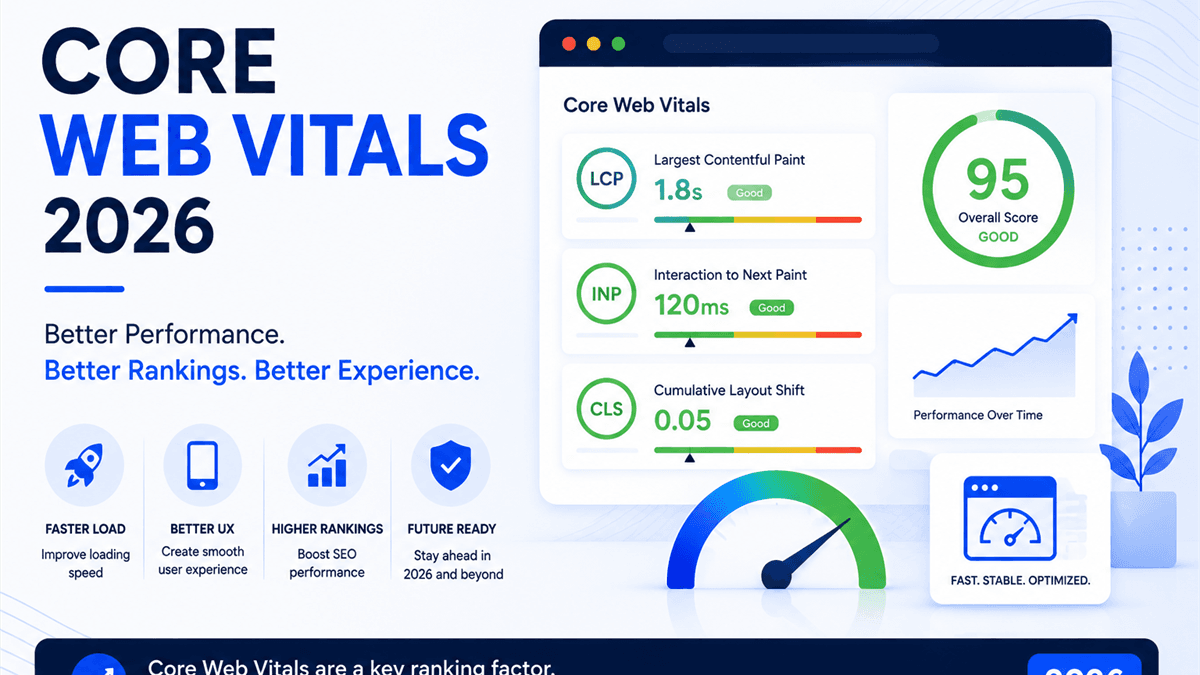
Core Web Vitals are Google's real-world performance metrics for loading speed, responsiveness, and visual stability. In 2026, they matter because users expect fast websites, AI search systems depend on accessible pages, and Google continues to recommend strong page experience as part of sustainable search performance.
For business owners and marketing teams, Core Web Vitals are not only a developer scorecard. They affect how quickly visitors understand your offer, how confidently they interact with forms and navigation, and how often slow pages waste paid and organic traffic. A technically strong site supports SEO services, Technical SEO, On-Page SEO, Content Writing, and conversion work at the same time.
This guide explains what changed, how Google measures Core Web Vitals, how LCP, INP, and CLS work, and how to improve performance without chasing random PageSpeed scores. It also connects performance to AI search, answer engines, and practical business outcomes.
Featured answer: Core Web Vitals are LCP, INP, and CLS. They measure how fast the main content loads, how quickly the page responds to interactions, and how stable the layout feels while loading. A good Core Web Vitals strategy improves user experience, SEO resilience, conversions, and technical quality.
What Are Core Web Vitals?
Core Web Vitals are a set of page experience metrics created to measure important parts of real user experience. Google defines them as metrics for loading performance, interactivity, and visual stability in Core Web Vitals and Google Search.
The current Core Web Vitals are:
- Largest Contentful Paint (LCP): How quickly the largest visible content element loads.
- Interaction to Next Paint (INP): How quickly the page responds to user interactions.
- Cumulative Layout Shift (CLS): How much the layout shifts unexpectedly while the page loads or changes.
The short version is simple: Core Web Vitals measure whether a page feels fast, responsive, and stable to real users.
| Metric | Measures | Good threshold | Business meaning |
|---|---|---|---|
| LCP | Loading performance | 2.5 seconds or faster | Users see the main content quickly |
| INP | Responsiveness | 200 milliseconds or faster | Clicks, taps, and keystrokes feel smooth |
| CLS | Visual stability | 0.1 or lower | Content does not jump around unexpectedly |
These metrics are field metrics. That means the most important data comes from real visitors, not only from a lab test on a perfect connection. A site can score well in a local test but still fail for mobile users on slower devices or weaker networks.
RankForge Insight: Core Web Vitals are not about pleasing a tool. They are about reducing friction between user intent and action.
score = (business_value * ranking_gap) / implementation_effortWhy Core Web Vitals Matter in 2026
Core Web Vitals matter in 2026 because search has become more competitive, users are less patient, and websites are expected to perform well across mobile, desktop, paid traffic, organic traffic, and AI-assisted discovery.
Google says site owners should achieve good Core Web Vitals for success with Search and for a better user experience generally. That wording is important. Core Web Vitals are not a magic ranking switch, but they align with the kind of page experience Google's systems try to reward.
The bigger business reason is conversion. Slow, unstable, or unresponsive pages create doubt. A visitor who waits too long for a hero image, taps a button that does not respond, or loses their place because the layout shifts is less likely to call, book, buy, or submit a form.
Core Web Vitals also matter for AI search and answer engines. AI systems still need accessible, crawlable, well-structured pages. If performance problems delay rendering, hide content behind heavy JavaScript, or create poor mobile experiences, your content becomes harder to evaluate and less useful for users.
This connects directly to Answer Engine Optimization. The best AI visibility strategy is built on the same foundation as modern SEO: helpful content, clean technical implementation, fast rendering, internal links, structured data, and trustworthy brand signals.
Common situations where Core Web Vitals deserve attention include:
- Organic traffic is growing but conversion rate is weak.
- Paid campaigns send traffic to slow landing pages.
- Search Console shows poor mobile URLs.
- Product, service, or location pages use large hero images.
- A redesign added scripts, animations, fonts, or layout shifts.
- A Next.js website ships too much JavaScript to the client.
Pro Tip: Treat Core Web Vitals as a revenue and trust issue first, then as an SEO issue. That framing helps teams prioritize fixes that users actually feel.
The Three Core Web Vitals Explained
The three Core Web Vitals work together, but each one diagnoses a different part of the experience. A page can pass LCP but fail INP. A page can feel visually polished but still shift when ads, fonts, images, or embeds load. A page can be fast on desktop and weak on mobile.
| Metric | User question | Common root causes |
|---|---|---|
| LCP | Did the main content appear quickly? | Slow server response, unoptimized hero image, render-blocking CSS, delayed resource discovery |
| INP | Did the page respond quickly after I interacted? | Heavy JavaScript, long tasks, hydration cost, third-party scripts, expensive event handlers |
| CLS | Did the layout stay stable? | Unsized images, injected banners, late-loading fonts, ads, embeds, dynamic components |
Good performance is not achieved by optimizing one number in isolation. You need to understand the template, the device, the network, the JavaScript cost, the media strategy, and how users interact with the page.
For example, a service page may fail LCP because the hero image is too large. A blog article may fail CLS because images lack dimensions. A pricing page may fail INP because a heavy animation library or tracking stack blocks the main thread. Each problem requires a different fix.
The sections below break down each metric in practical language.
Largest Contentful Paint (LCP)
Largest Contentful Paint measures how long it takes for the largest visible content element to render in the viewport. In many modern layouts, the LCP element is a hero image, banner, featured image, main heading, or large block of above-the-fold text.
Google recommends an LCP of 2.5 seconds or faster for a good user experience. Pages above 4 seconds are considered poor in the Core Web Vitals report.
| LCP status | Threshold | What it means |
|---|---|---|
| Good | 2.5s or faster | Main content appears quickly |
| Needs improvement | Over 2.5s to 4s | Users may wait before the page feels useful |
| Poor | Over 4s | Main content is noticeably delayed |
LCP is often the metric that exposes problems in the first few seconds of loading. The cause may be server response time, redirects, slow HTML, blocked CSS, delayed image loading, or JavaScript that prevents the main content from rendering.
Practical LCP fixes include:
- Make the LCP image discoverable in the initial HTML.
- Use the right image dimensions and modern formats.
- Avoid lazy loading the above-the-fold LCP image.
- Preload or prioritize the most important image when appropriate.
- Reduce server response time with caching and CDN strategy.
- Remove render-blocking CSS and unnecessary scripts from the critical path.
- Keep above-the-fold content simple enough to render early.
The Chrome team explains in effective Core Web Vitals optimizations that LCP often improves when the LCP resource is discoverable from the HTML and prioritized correctly. For businesses, this frequently means treating the hero section as a performance asset, not just a design asset.
Common mistake: Compressing every image on the site but ignoring the one image that actually becomes the LCP element.
Interaction to Next Paint (INP)
Interaction to Next Paint measures responsiveness. It looks at how long the page takes to respond after a user clicks, taps, or types. INP replaced First Input Delay as a Core Web Vital because it better reflects responsiveness across the full page visit, not only the first interaction.
Google's good threshold for INP is 200 milliseconds or faster. A value over 500 milliseconds is poor.
| INP status | Threshold | User experience |
|---|---|---|
| Good | 200ms or faster | Interactions feel immediate |
| Needs improvement | Over 200ms to 500ms | Some interactions feel delayed |
| Poor | Over 500ms | The page feels sluggish or broken |
INP is usually a JavaScript and main-thread problem. If a page ships too much client-side code, hydrates too many components, runs expensive event handlers, or loads heavy third-party scripts, the browser may not respond quickly when the user interacts.
INP problems often appear on pages with:
- Large JavaScript bundles.
- Complex navigation menus or filters.
- Heavy analytics and tag-manager setups.
- Chat widgets, maps, videos, and embeds.
- Client-rendered dashboards or calculators.
- Unnecessary state updates above the fold.
Practical INP fixes include:
- Reduce JavaScript shipped to the page.
- Split non-critical code and load it later.
- Defer third-party scripts that are not needed for the first interaction.
- Break long tasks into smaller chunks.
- Remove expensive event handlers.
- Prefer server-rendered content where possible.
- Audit hydration cost in React and Next.js.
For Next.js sites, INP is where architecture matters. A page that could be a server component should not become a large client component just because one small button needs interactivity. Use client components deliberately.
Best Practice: If a component is below the fold, interactive only after user intent, or not essential for first paint, consider lazy loading it.
Cumulative Layout Shift (CLS)
Cumulative Layout Shift measures visual stability. It captures unexpected movement of visible content. A low CLS means the page stays steady while images, fonts, ads, banners, embeds, and dynamic content load.
A good CLS score is 0.1 or lower. A score above 0.25 is poor.
| CLS status | Threshold | What users feel |
|---|---|---|
| Good | 0.1 or lower | Layout feels stable |
| Needs improvement | Over 0.1 to 0.25 | Some content moves unexpectedly |
| Poor | Over 0.25 | Users may misclick or lose context |
CLS is frustrating because it often happens after the page looks ready. A visitor moves to tap a button, then a banner loads and shifts the button down. Or they start reading an article and a late-loading font changes the text height.
Common CLS causes include:
- Images without width and height.
- Video embeds without reserved space.
- Ads or iframes injected into the page after load.
- Cookie banners that push content instead of overlaying or reserving space.
- Web fonts that swap late and change layout.
- Accordions, cards, or counters that resize after hydration.
CLS fixes are usually practical and measurable:
- Reserve dimensions for images, videos, ads, and embeds.
- Use stable aspect-ratio containers.
- Avoid inserting content above existing content unless space is reserved.
- Use font-display strategies carefully.
- Keep skeleton loaders and final components the same size.
- Test templates on mobile, not only desktop.
The Chrome team notes in Core Web Vitals threshold guidance that these metrics are judged at the 75th percentile, which means the goal is not perfection for one test. The goal is a consistently good experience for most real users.
How Google Measures Core Web Vitals
Google uses real-world user experience data for Core Web Vitals reporting. The most important public dataset is the Chrome User Experience Report, often called CrUX. PageSpeed Insights, Search Console, and CrUX tools expose that data in different ways.
The key detail is the 75th percentile. A URL or origin is generally evaluated based on whether at least 75 percent of page views meet the good threshold for each metric. That helps avoid judging a site by one unusually fast or slow visit.
| Data type | Source | Best use | Limitation |
|---|---|---|---|
| Field data | Real Chrome users via CrUX | Understand real user experience | Requires enough traffic and data |
| Lab data | Lighthouse and simulated tests | Debug specific issues before release | Cannot fully represent real users |
| Real user monitoring | Your analytics or RUM setup | Track your own visitors and segments | Requires implementation and reporting |
Google Search Console's Core Web Vitals report groups URLs by status, metric, platform, and similar URL patterns. That grouping is useful because many performance problems are template-level problems.
For example:
- All blog articles may share the same featured-image issue.
- All service pages may share the same font or hero layout issue.
- All product pages may share the same review widget or image gallery issue.
- All location pages may share the same map embed problem.
This is why Core Web Vitals should be part of a recurring Technical SEO audit, not a one-time score check.
PageSpeed Insights
PageSpeed Insights is often the first tool teams use because it combines field data and lab diagnostics in one report. Google's PageSpeed Insights documentation explains that PSI reports both real-user data from CrUX and lab data from Lighthouse.
Use PageSpeed Insights to answer three questions:
- Does the page have enough real-user data?
- Which Core Web Vital is failing on mobile or desktop?
- Which lab diagnostics explain the likely cause?
Do not treat the 0-100 performance score as the entire story. A high score can still hide a real-user issue, and a low score may be less urgent than a failing field metric on a high-value page.
A practical PSI workflow:
- Test the homepage, top service pages, top blog pages, and top landing pages.
- Compare mobile and desktop separately.
- Identify the LCP element and whether it is delayed.
- Review render-blocking resources and unused JavaScript.
- Check whether third-party scripts contribute to long tasks.
- Export findings into developer-ready tickets.
For RankForge clients, PSI is a diagnostic entry point. It is useful, but it should be paired with Search Console, CrUX, analytics, and template-level code review.
Chrome User Experience Report
The Chrome User Experience Report is a public dataset of real-user experiences from Chrome users who meet eligibility requirements. The CrUX API documentation explains that CrUX reports field experience data at the origin and URL level, including LCP, INP, and CLS.
CrUX is valuable because it reflects real devices, networks, locations, and browsing conditions. That matters for businesses that serve users across regions, devices, and connection speeds.
Use CrUX when you need to:
- Track origin-level performance over time.
- Compare mobile and desktop field performance.
- Understand whether problems affect one page or a full template.
- Validate that deployed fixes improved real-user data after the 28-day window updates.
- Build reporting for leadership without relying only on one Lighthouse run.
CrUX can lag behind new deployments because it is based on collected field data. That is normal. Use lab tools to validate immediate fixes, then use CrUX and Search Console to confirm real-world impact over time.
Google Search Console
Google Search Console shows Core Web Vitals issues grouped by URL patterns. This is one of the most practical views for SEO teams because it connects performance status to indexed URLs.
Search Console is especially useful for prioritization:
- Fix pages with impressions and revenue potential first.
- Look for template-wide issues affecting many URLs.
- Separate mobile and desktop problems.
- Validate fixes after deployment.
- Monitor whether URL groups move from Poor to Needs Improvement to Good.
A common mistake is trying to fix every URL individually. If Search Console groups dozens of pages together, the issue is probably in a shared template, component, image pattern, script, font, or layout rule.
For example, if every case study page fails CLS, inspect the shared case study layout. If every blog post fails LCP, inspect the blog featured image rendering. If service pages fail INP, inspect shared navigation, animations, and third-party scripts.
This template-level thinking is also central to Technical SEO, because it improves the whole site instead of chasing isolated symptoms.
Lighthouse
Lighthouse is a lab audit tool available in Chrome DevTools and through PageSpeed Insights. It is useful for debugging performance before changes reach real users. Chrome's Lighthouse documentation describes it as a report covering performance, accessibility, best practices, SEO, and more.
Lighthouse is excellent for finding:
- Render-blocking resources.
- Unused JavaScript.
- Oversized images.
- Main-thread work.
- Third-party script cost.
- Layout shifts during load.
- Accessibility and best-practice issues.
But Lighthouse is not a complete replacement for field data. It runs in a controlled environment. It may not capture every real interaction, especially for INP. The web.dev Web Vitals guide notes that lab tools cannot fully replace field measurement because real users have different devices, networks, and behavior.
Use Lighthouse to debug. Use CrUX, Search Console, and real user monitoring to validate.
How Core Web Vitals Affect SEO
Core Web Vitals affect SEO by supporting page experience, crawlable rendering, user satisfaction, and conversion paths. They are not a shortcut around relevance, helpful content, or authority. A fast but thin page is still a thin page.
A strong SEO strategy combines performance with the rest of the organic growth system:
- Technical SEO for crawlability, rendering, indexation, structured data, and performance.
- On-Page SEO for search intent, headings, metadata, and internal links.
- Content Writing for useful, expert-led content.
- Off-Page SEO for credibility, mentions, and authority.
- Local SEO for location signals, Google Business Profile, and local trust.
Performance becomes especially important when competitors are similar in relevance and authority. If two pages both answer the query well, the one that loads faster and feels better has a stronger user experience.
Core Web Vitals also help preserve the value of content investments. A complete guide, service page, or local landing page cannot perform at its full potential if visitors leave before it becomes useful.
RankForge Insight: Core Web Vitals rarely win SEO alone, but poor performance can quietly weaken everything else your SEO program is trying to do.
How Core Web Vitals Affect Conversions
Core Web Vitals affect conversions because they shape the user's first impression and every interaction after it. Slow loading delays trust. Poor responsiveness creates doubt. Layout shifts cause frustration and misclicks.
This matters across traffic channels:
| Channel | Performance risk | Business impact |
|---|---|---|
| Organic search | Users bounce before reading the page | Lower engagement and weaker lead flow |
| Paid search | Clicks land on slow pages | Higher cost per lead and wasted spend |
| Local SEO | Mobile users abandon service pages | Fewer calls, directions, and bookings |
| Content marketing | Readers do not reach CTAs | Lower assisted conversions |
| AI search | Users expect fast source pages | Lower trust after the click |
A PPC campaign can waste budget when the landing page is slow. The Paid Search Waste Audit explains why tracking and landing page quality should be evaluated together. Performance is part of that same conversation.
For local businesses, speed and responsiveness matter because searchers are often ready to act. Someone comparing emergency roofing, dental appointments, or legal consultations may not wait for a slow page. Strong Core Web Vitals help the page support the urgency of the search.
The Google Business Profile Optimization Guide and Local SEO Playbook both depend on the same idea: discovery only creates business value when the page experience helps users act.
Relevant examples from RankForge's case study library and our Law Firm SEO services show where trust, page clarity, and conversion paths all matter.
Common Performance Mistakes
Most Core Web Vitals problems come from a small set of repeated mistakes. The details vary by site, but the patterns are familiar.
Common mistakes include:
- Uploading oversized images without responsive sizes.
- Lazy loading the hero image that becomes the LCP element.
- Loading every script on every page.
- Using client-side rendering where server rendering would be simpler.
- Adding tag-manager scripts without governance.
- Embedding videos, maps, chat widgets, and forms above the fold.
- Using custom fonts without a loading strategy.
- Injecting banners, ads, or popups without reserving space.
- Ignoring mobile field data because desktop looks fine.
- Chasing a Lighthouse score without fixing real-user problems.
- Allowing old plugins or libraries to stay in the bundle.
- Treating Core Web Vitals as a one-time launch task.
| Mistake | Metric affected | Better approach |
|---|---|---|
| Huge hero image | LCP | Compress, resize, prioritize, and serve responsive images |
| Heavy scripts | INP | Defer, split, remove, or load by user intent |
| Unsized media | CLS | Reserve width, height, or aspect ratio |
| Slow server | LCP | Improve caching, CDN, and backend response time |
| Late font swap | CLS and LCP | Preload key fonts and use stable fallbacks |
Common Mistake: Running PageSpeed Insights once, forwarding the screenshot, and calling it a strategy. A real performance plan turns diagnostics into prioritized engineering work.
Image Optimization
Image optimization is often the fastest path to better LCP. Many pages use a large hero image, blog featured image, product image, or background visual as the largest visible element.
Practical image fixes include:
- Use modern formats such as WebP or AVIF where supported.
- Serve responsive image sizes instead of one oversized file.
- Define width, height, or aspect ratio to prevent layout shift.
- Avoid lazy loading above-the-fold hero images.
- Use meaningful alt text for accessibility and image understanding.
- Compress images without destroying visual quality.
- Audit image rendering on mobile and desktop.
For Next.js sites, the built-in image component can help with responsive sizing and optimization, but it still needs correct configuration. If the parent container crops the image, the file may be fine while the rendering is wrong. If sizes are inaccurate, the browser may download a larger image than needed.
A good image workflow asks:
- Is this image necessary above the fold?
- Is it the likely LCP element?
- Is it discoverable early?
- Is the displayed size close to the downloaded size?
- Is space reserved before it loads?
- Does it stay sharp without being oversized?
This is especially important for blog articles, resources, and service pages where visuals support trust but should not slow the experience.
JavaScript Optimization
JavaScript optimization is central to INP. A page can load quickly and still feel slow if the browser is busy parsing, compiling, hydrating, and executing scripts when the user tries to interact.
Start by identifying which JavaScript is critical and which is not. Navigation, forms, and visible controls may need early interactivity. Carousels, below-the-fold widgets, analytics extras, and decorative animation often do not.
Practical JavaScript improvements include:
- Remove unused libraries.
- Split large bundles by route and component.
- Defer non-critical scripts.
- Lazy load below-the-fold interactive features.
- Replace heavy client components with server-rendered markup where possible.
- Limit tag-manager scripts to pages that need them.
- Audit third-party script cost regularly.
- Break long tasks so the browser can respond sooner.
Third-party scripts deserve special attention. Analytics, heatmaps, chat widgets, A/B testing, social embeds, and ad pixels can all add main-thread work. They may be useful, but they should have a clear business reason and a loading strategy.
For SEO teams, JavaScript optimization matters because rendering and interaction problems can affect users and crawlers. If a page depends on client-side JavaScript to display important content, it needs careful technical review.
Caching and Server Response Time
Server response time influences LCP because the browser cannot render the page until it receives the HTML and key resources. If Time to First Byte is slow, the page begins the race late.
Caching and delivery improvements can include:
- Use a CDN for static assets and globally distributed visitors.
- Cache pages or fragments that do not need to be generated on every request.
- Reduce redirect chains.
- Optimize database queries and backend APIs.
- Compress text assets.
- Set appropriate cache headers for images, fonts, CSS, and JavaScript.
- Keep hosting close to the user base where practical.
For ecommerce, SaaS, and multi-location sites, caching strategy should be planned carefully. Some pages can be static. Some need fresh inventory, pricing, or availability. Some can use incremental regeneration or edge caching.
The goal is not to cache blindly. The goal is to make stable content fast while keeping dynamic content accurate.
Best Practice: If a page has strong organic or paid traffic value, treat server response time as part of the conversion path.
Fonts and Rendering
Fonts can improve brand presentation, but poor font loading can hurt LCP and CLS. Late font swaps may change text size and move content. Too many font weights can add unnecessary network cost.
A practical font strategy includes:
- Use only the weights and styles the design truly needs.
- Preload critical fonts when appropriate.
- Use font-display intentionally.
- Choose fallback fonts with similar metrics.
- Avoid loading multiple brand fonts above the fold.
- Test mobile rendering, not only desktop screenshots.
Rendering problems also come from CSS and layout complexity. Large CSS files, unused styles, blocking stylesheets, heavy animations, and complex above-the-fold components can delay useful paint.
The best design systems make performance part of the component rules. Cards have stable dimensions. Images have aspect ratios. Buttons do not shift. Headers and hero sections load predictably. This creates a premium experience because the interface feels calm and reliable.
Technical SEO Improvements
Core Web Vitals work best when paired with broader technical SEO. Performance fixes should not create indexing, accessibility, or rendering problems.
A technical SEO review should include:
- Crawlability and indexability.
- Canonical tags and duplicate URL handling.
- XML sitemap accuracy.
- Robots.txt rules.
- Structured data validation.
- Internal linking and crawl depth.
- Mobile rendering.
- Core Web Vitals by template.
- Broken links and redirect chains.
- Open Graph and metadata checks.
The Technical SEO Audit Checklist covers this larger workflow. Core Web Vitals are one part of it, but they often reveal deeper issues in architecture, templates, asset strategy, and script governance.
For AI search, technical SEO becomes even more important. AI-powered search systems need content that is accessible, understandable, and trustworthy. Fast pages with clear structure, schema, and internal links are easier to retrieve and evaluate.
This is where RankForge approaches performance as part of a complete growth system, not a standalone speed project.
Next.js Optimization Tips
Next.js can produce very fast websites, but it can also produce slow pages if every component becomes client-side, every script loads early, or images are configured poorly.
Use this practical Next.js checklist:
- Prefer server components for static or content-heavy sections.
- Use client components only where interactivity is required.
- Keep analytics scripts in appropriate loading strategies.
- Use dynamic imports for non-critical interactive components.
- Configure images with accurate sizes.
- Prioritize the LCP image only when it is truly above the fold.
- Avoid layout shifts by defining dimensions and aspect ratios.
- Reduce shared JavaScript in layouts and providers.
- Monitor route-level bundle size.
- Test both mobile and desktop builds.
For LCP, review whether the hero content is server-rendered and whether the primary image is discoverable early. For INP, inspect hydration and long tasks. For CLS, check image containers, dynamic sections, and fonts.
A common Next.js issue is moving too much logic into a top-level provider or shared layout. That can send unnecessary JavaScript to every page. A better pattern is to keep global code lean and load page-specific behavior only where needed.
Pro Tip: In Next.js performance work, the question is not only what can be optimized. It is what should never have shipped to that route in the first place.
Core Web Vitals Checklist
Use this checklist when auditing an existing website or preparing a launch.
Measurement
- Check PageSpeed Insights for mobile and desktop.
- Review Search Console Core Web Vitals URL groups.
- Compare CrUX field data with Lighthouse lab data.
- Identify the LCP element on key templates.
- Review INP risk through long tasks and JavaScript cost.
- Inspect CLS causes during load and after interaction.
LCP improvements
- Improve server response time.
- Remove unnecessary redirects.
- Prioritize the LCP image or text.
- Compress and resize hero images.
- Remove render-blocking resources.
- Keep above-the-fold sections lightweight.
INP improvements
- Reduce client-side JavaScript.
- Split heavy components.
- Delay non-critical third-party scripts.
- Optimize event handlers.
- Avoid unnecessary re-renders.
- Monitor hydration cost.
CLS improvements
- Reserve space for images, videos, embeds, and ads.
- Stabilize font loading.
- Avoid injecting content above existing content.
- Match skeleton loader dimensions to final content.
- Test banners, forms, menus, and sticky elements on mobile.
SEO and conversion checks
- Confirm important content remains crawlable.
- Validate schema after performance changes.
- Recheck metadata and canonical tags.
- Track conversions before and after fixes.
- Connect performance work to Resources, service pages, and case study proof.
A practical Core Web Vitals audit should end with a prioritized roadmap, not a list of every possible improvement.
Future of Core Web Vitals
The future of Core Web Vitals will likely remain focused on real user experience. Metrics may evolve, but the direction is clear: websites should load quickly, respond quickly, and remain stable across real devices.
Several trends matter for 2026 and beyond:
- More visibility into real-user performance by template and device.
- Greater focus on interaction quality as websites become more app-like.
- Continued pressure to reduce unnecessary JavaScript.
- Stronger connections between performance, accessibility, and conversion.
- More AI search journeys where users click fewer pages but expect better source experiences.
- Growing importance of edge delivery, caching, and clean rendering architecture.
Core Web Vitals will also become part of brand trust. Users may not know the names LCP, INP, or CLS, but they notice when a site feels slow, jumpy, or unreliable.
The best long-term approach is operational. Add performance budgets. Review new scripts before they ship. Test templates before launch. Monitor field data after deployment. Treat performance as a quality standard, not a cleanup task.
Frequently Asked Questions
What are Core Web Vitals?
Core Web Vitals are Google's key user experience metrics for loading performance, responsiveness, and visual stability. The current metrics are Largest Contentful Paint, Interaction to Next Paint, and Cumulative Layout Shift.
What are the Core Web Vitals thresholds in 2026?
The good thresholds are LCP at 2.5 seconds or faster, INP at 200 milliseconds or faster, and CLS at 0.1 or lower. Pages above 4 seconds LCP, 500 milliseconds INP, or 0.25 CLS are considered poor.
Do Core Web Vitals affect Google rankings?
Core Web Vitals are part of page experience. They do not replace relevance, content quality, or authority, but good performance supports better user experience and aligns with what Google's ranking systems aim to reward.
What is the difference between lab data and field data?
Lab data comes from controlled tests such as Lighthouse. Field data comes from real users, usually through CrUX or real user monitoring. Lab data helps debug issues, while field data shows actual user experience.
Why is my Lighthouse score different from Search Console?
Lighthouse tests one simulated visit under controlled conditions. Search Console uses real-user CrUX data over time and groups similar URLs. The two tools answer different questions and should be used together.
How do I improve LCP?
Improve server response time, reduce render-blocking resources, optimize the LCP image or text, avoid lazy loading above-the-fold hero images, and make critical resources discoverable early.
How do I improve INP?
Reduce JavaScript, remove unnecessary client-side work, split heavy components, defer third-party scripts, optimize event handlers, and reduce long tasks that block the main thread.
How do I improve CLS?
Reserve space for images, embeds, ads, banners, and dynamic components. Use stable aspect ratios, set image dimensions, manage font loading, and avoid injecting content above existing content.
Are Core Web Vitals important for local SEO?
Yes. Local searchers often use mobile devices and want fast answers. Strong Core Web Vitals help Local SEO pages support calls, bookings, directions, and trust-building content.
Can Core Web Vitals help AI search visibility?
Indirectly, yes. AI search systems need accessible, useful, and technically reliable pages. Faster rendering, cleaner structure, and better user experience support both traditional SEO and AI Search Optimization.
Conclusion
Core Web Vitals in 2026 are a practical measure of website quality. They show whether users can see, use, and trust a page without waiting, fighting delayed interactions, or dealing with unstable layouts.
The strongest performance strategy is not a random list of optimizations. It starts with measurement, identifies the failing templates, connects each metric to likely causes, and prioritizes fixes by business value. LCP often points to loading and asset problems. INP often points to JavaScript and main-thread work. CLS often points to unstable layout rules.
For SEO, Core Web Vitals are part of a larger system. They work alongside helpful content, crawlability, structured data, internal links, authority, and conversion strategy. For AI search, they support accessible and trustworthy source pages. For paid campaigns, they help protect budget from slow landing pages.
If your site is losing speed, rankings, or conversions, start with a structured performance and technical SEO audit. Explore RankForge Technical SEO services, review our SEO resources, or contact RankForge to turn Core Web Vitals issues into a practical roadmap for faster pages and stronger organic growth.
Ready to turn this into a roadmap?
RankForge can audit your site, prioritize the best opportunities, and build the growth system behind them.
Request free audit