Technical SEO Audit vs. SEO Audit: What's the Difference? A 2026 Guide
Technical SEO audits and SEO audits solve different problems. Learn what each audit checks, when you need one, and how to evaluate your website in 2026.
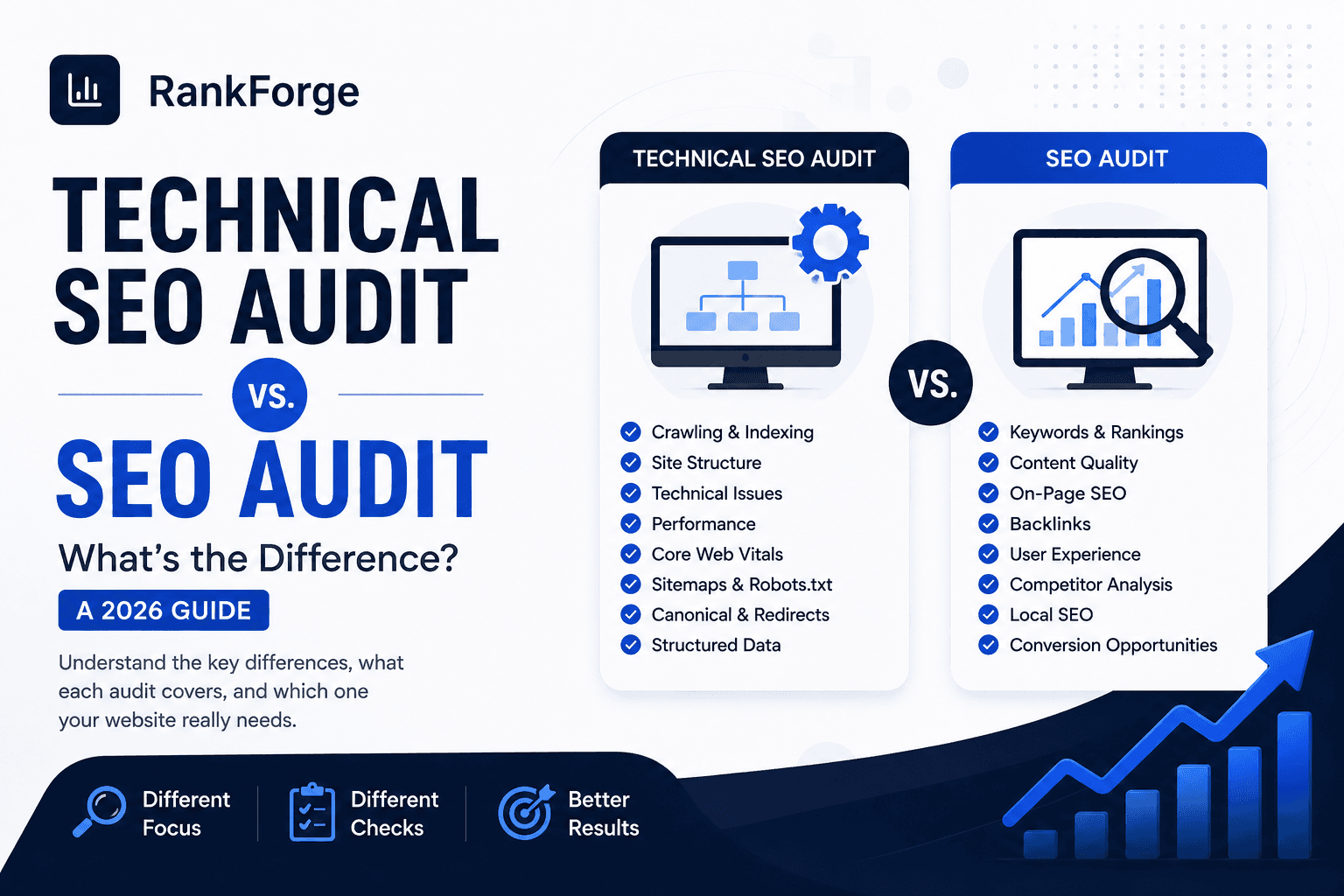
An SEO audit and a technical SEO audit are related, but they are not the same thing. An SEO audit looks at the whole search growth system: technical health, content, intent, on-page optimization, authority, local visibility, and conversion opportunities. A technical SEO audit focuses on the infrastructure that helps search engines crawl, render, index, and understand your website.
The confusion is understandable. Many audit tools use the phrase "site audit" for every warning they find, and many agencies package technical checks inside a broader SEO review. But the difference matters when you are deciding what to fix, which specialist to hire, and how to protect organic growth after a redesign, migration, or CMS change.
Featured answer: A technical SEO audit checks whether search engines can crawl, render, index, and understand your website. A full SEO audit includes technical SEO, but also reviews content quality, search intent, keyword targeting, internal links, backlinks, local SEO, SERP visibility, and conversion opportunities. Most businesses need both, but not always at the same time.
This guide explains the difference in plain English, shows what each audit includes, and gives you a decision framework for choosing the right next step. If you already know you need a hands-on technical review, start with RankForge's Technical SEO services or use our complete technical SEO audit checklist as the detailed companion resource.
What Is an SEO Audit?
An SEO audit is a full review of how well a website can earn, keep, and convert organic visibility. It is broader than a crawl report. A good SEO audit connects search data, website structure, content quality, user intent, authority signals, local visibility, and business goals.
The purpose is not to create a long list of warnings. The purpose is to identify why the website is not performing as well as it should and which improvements are most likely to increase qualified traffic, leads, sales, or booked calls.
A full SEO audit usually reviews:
- Technical SEO and indexability
- Keyword targeting and search intent
- On-page SEO elements such as titles, headings, and internal links
- Content quality, freshness, and topical depth
- Backlink profile and authority signals
- Local SEO signals for businesses that serve specific areas
- SERP competitors and content gaps
- Conversion paths, calls to action, and lead quality
- Analytics, Search Console, and tracking accuracy
For example, a service business may have strong technical health but weak local landing pages. In that case, the problem is not crawling. The bigger issue may be content relevance, service-area coverage, or Google Business Profile alignment. That is why a broader SEO strategy often looks beyond the technical layer.
RankForge Insight: An SEO audit should help you decide what to do next. If the report does not separate urgent fixes from low-impact noise, it is not yet a strategy.
score = (business_value * ranking_gap) / implementation_effortWhat Is a Technical SEO Audit?
A technical SEO audit is a focused review of the systems that help search engines access, render, index, and interpret a website. It looks under the hood: crawl paths, sitemaps, redirects, canonical tags, page status codes, structured data, internal links, mobile usability, JavaScript rendering, Core Web Vitals, and template-level issues.
Technical audits are especially important because technical problems can limit every other SEO effort. A page with excellent content cannot rank if it is blocked, noindexed, canonicalized incorrectly, hidden behind broken JavaScript, or excluded from important internal links.
Common technical SEO audit questions include:
- Can Google crawl the important pages?
- Are indexable pages actually being indexed?
- Are important URLs included in the XML sitemap?
- Are redirects clean and intentional?
- Are canonical tags pointing to the right pages?
- Are duplicate URLs controlled?
- Are page templates creating thin or duplicate pages?
- Can Google render key content and links?
- Are Core Web Vitals strong enough for real users?
- Does structured data validate and match visible page content?
Technical SEO does not replace on-page SEO, content strategy, or authority building. It creates the foundation those efforts need. When the foundation is weak, even high-quality content can underperform.
Technical SEO Audit vs. SEO Audit: The Key Differences
The simplest way to understand the difference is this: a technical SEO audit asks whether the website can be discovered and understood properly. A full SEO audit asks whether the entire organic growth system is strong enough to attract the right audience and turn visibility into business value.
| Area | Technical SEO audit | Full SEO audit |
|---|---|---|
| Purpose | Find infrastructure issues that limit crawling, indexing, rendering, performance, and structured understanding | Find the biggest opportunities across technical SEO, content, authority, local visibility, and conversions |
| Crawling | Deep review of crawl paths, robots.txt, sitemaps, status codes, and internal links | Included, but usually prioritized against other growth opportunities |
| Indexing | Reviews noindex, canonical conflicts, duplicate URLs, index coverage, and sitemap signals | Included with analysis of which pages deserve to rank |
| Technical infrastructure | Primary focus | One part of the broader audit |
| On-page SEO | Checks whether templates create technical or structural issues | Reviews titles, headings, copy, internal links, keyword targeting, and intent alignment |
| Content | Looks for technical content accessibility and duplication | Reviews quality, freshness, depth, topical authority, and helpfulness |
| Backlinks | Usually limited to technical link issues such as broken links or redirect chains | Reviews authority, referring domains, link risk, and competitive gaps |
| Local SEO | Checks crawlable local pages and structured data | Reviews Google Business Profile, reviews, location pages, and local intent |
| Structured data | Deep validation of schema implementation and errors | Reviews schema as part of search appearance and entity clarity |
| Performance | Reviews Core Web Vitals, rendering, page speed, and mobile usability | Reviews performance plus its effect on rankings and conversions |
| Recommendations | Technical fixes, developer tickets, prioritization by impact | Strategic roadmap across SEO, content, authority, local, and conversion work |
Both audits can be valuable. The right choice depends on the symptoms. A site with indexing problems, migration risk, JavaScript issues, or Core Web Vitals failures needs a technical audit first. A site that is technically sound but not generating qualified demand needs a broader SEO audit.
What Does a Technical SEO Audit Check?
A technical SEO audit examines the parts of the website that affect search engine access, interpretation, and user experience. The work usually combines crawling tools, Google Search Console, analytics data, manual inspection, and template-level review.
Important technical checks include:
- Crawlability: Search engines must be able to discover important URLs through links, sitemaps, and clean site architecture.
- Indexability: Valuable pages should be indexable, while private, duplicate, thin, or low-value pages should be controlled.
- Robots.txt: The file should not block important pages, CSS, JavaScript, or assets needed for rendering.
- XML sitemap: The sitemap should include canonical, indexable URLs and exclude redirects, noindex pages, and error URLs.
- Canonical tags: Canonicals should clarify the preferred page instead of accidentally pointing Google away from important content.
- Redirects: Redirects should be direct, relevant, and free from loops or long chains.
- HTTP status codes: Important pages should return 200 status codes, while removed pages should use the right 3xx or 4xx response.
- Duplicate URLs: Parameter URLs, trailing slash variants, uppercase URLs, filters, and CMS archives should be controlled.
- Internal links: Important pages need crawlable internal links from relevant sections of the site.
- JavaScript rendering: Search engines need access to visible content, links, metadata, and structured data after rendering.
- Mobile usability: Layout, tap targets, fonts, and content should work cleanly on mobile devices.
- Core Web Vitals: LCP, INP, and CLS should be reviewed with field data when available.
- Structured data: Schema should validate, match visible content, and support entity clarity.
- HTTPS: Secure pages, mixed content, and canonical URL consistency should be checked.
- URL architecture: URLs should be stable, descriptive, and aligned with the site's information architecture.
The goal is not to fix every low-priority warning. The goal is to find the technical issues that create ranking risk, indexing waste, poor user experience, or weak search understanding.
What Does a Full SEO Audit Check?
A full SEO audit includes technical SEO, but it does not stop there. It evaluates the complete organic growth system and asks whether the site deserves to rank for the searches that matter.
A broader SEO audit commonly checks:
- Technical SEO foundations
- On-page optimization and page structure
- Search intent alignment
- Keyword targeting and content gaps
- Content quality, depth, and freshness
- Internal linking strategy
- Topic clusters and topical authority
- Backlinks and digital authority
- Local SEO signals for location-based businesses
- SERP features, featured snippets, and AI Overview opportunities
- Landing page clarity and conversion paths
- Analytics setup and goal tracking
For example, a roofing company may have no serious crawl errors, but its service pages may not explain emergency repair, roof replacement, inspection, financing, service areas, or customer trust signals clearly enough. That is a broader SEO issue, not a purely technical one.
Similarly, a local clinic may need stronger location pages, review signals, and Google Business Profile alignment. In that case, Local SEO may produce more value than another round of technical cleanup.
Best practice: Use a full SEO audit when rankings, traffic, and leads are weak but there is no obvious technical failure. Use a technical audit when access, indexing, rendering, speed, or migration risk is the main concern.
When Should You Get a Technical SEO Audit?
You should get a technical SEO audit when there is a realistic chance that website infrastructure is holding back search performance. This is common after major design, development, platform, or content changes.
Strong reasons to request a technical audit include:
- A website redesign or relaunch
- A CMS migration or hosting change
- A domain change or URL structure change
- Sudden traffic drops after deployment
- Important pages not appearing in Google
- Crawl errors or indexing issues in Google Search Console
- Large websites with many templates, filters, or parameters
- JavaScript-heavy pages or app-like interfaces
- Slow mobile performance or Core Web Vitals failures
- Duplicate pages, canonical conflicts, or redirect problems
- Unexplained ranking volatility
Technical audits are also useful before launching a new site. It is much easier to prevent broken redirects, indexation mistakes, and sitemap problems before launch than to repair lost visibility after Google has already crawled the changed site.
If you are planning a redesign, migration, or major content restructure, involve technical SEO early. Developers, designers, and SEO specialists can then protect URLs, metadata, headings, internal links, structured data, and indexable content before anything goes live.
Why a Technical SEO Audit Matters After a Website Redesign
A redesign does not automatically hurt SEO. A well-planned redesign can improve speed, usability, conversion rate, content clarity, and long-term organic growth. The risk comes from changing important SEO signals without tracking what changed.
Website redesigns can affect:
- URL paths and redirect mapping
- Internal links and navigation depth
- Page titles and meta descriptions
- Canonical tags
- Headings and content hierarchy
- Structured data
- Indexability directives
- XML sitemap coverage
- JavaScript rendering
- Image loading and Core Web Vitals
- Template duplication
- Content removed during design cleanup
The most common mistake is treating SEO as a final checklist after the design is already approved. At that point, important pages may have been renamed, consolidated, removed, or buried. Search engines then need to reinterpret the site, and rankings can fluctuate while signals settle.
A post-redesign technical audit should compare the old and new site. It should check whether high-value URLs were preserved or redirected, whether important content remains crawlable, whether internal links still support priority pages, and whether Search Console reports any coverage issues after launch.
Common mistake: Launching a beautiful redesign without validating redirects, canonicals, schema, internal links, and sitemap updates. The site may look better to users while becoming harder for search engines to understand.
Can You Perform a Technical SEO Audit Yourself?
Yes, you can perform a basic technical SEO audit yourself, especially if your website is small. You can manually check whether important pages load, whether they appear in Google, whether the sitemap exists, whether forms work, and whether Search Console reports major errors.
Business owners and marketing managers can check:
- Whether important pages are indexed
- Whether page titles and descriptions look correct
- Whether the XML sitemap is submitted
- Whether the site works on mobile
- Whether important pages are linked from navigation or service hubs
- Whether obvious broken links exist
- Whether the site passes basic PageSpeed checks
- Whether Google Search Console reports indexing issues
However, professional technical audits become useful when the website is larger, has complex templates, uses JavaScript heavily, recently migrated, or depends heavily on organic traffic. A specialist can crawl the site at scale, compare log or crawl patterns, inspect rendered HTML, validate schema, prioritize developer tickets, and separate real risks from tool noise.
The difference is not only tools. It is interpretation. Many audit tools flag hundreds of items, but not every warning deserves developer time. A good technical SEO consultant explains which issues affect organic visibility, which affect user experience, and which can safely wait.
Technical SEO Audit Checklist
This checklist is intentionally concise. It summarizes the main categories without replacing RankForge's detailed technical SEO audit checklist, which covers the topic in a deeper step-by-step format.
Use this quick version when you need to understand the scope of a technical audit:
- Crawl the website and identify status-code issues.
- Review robots.txt for accidental blocking.
- Validate XML sitemap quality and Search Console submission.
- Check indexability for important pages.
- Review canonical tags for conflicts.
- Map redirects and remove unnecessary chains.
- Identify duplicate URLs and parameter issues.
- Confirm important pages have crawlable internal links.
- Inspect mobile usability and responsive behavior.
- Test Core Web Vitals and page speed issues.
- Review JavaScript-rendered content and links.
- Validate structured data and schema warnings.
- Check HTTPS, mixed content, and URL consistency.
- Review page templates for thin or duplicate output.
- Prioritize fixes by business impact and implementation effort.
For teams already investing in SEO, this checklist should connect directly to a roadmap. A crawl issue on an unimportant archive page is different from a crawl issue on a high-intent service page. Prioritization is where audit work turns into business value.
Which Audit Does Your Website Need?
Choose the audit based on the problem you are trying to solve. If your symptoms point to crawling, indexing, rendering, speed, redirects, or redesign risk, start with a technical SEO audit. If your symptoms point to weak visibility, poor content coverage, low authority, local search gaps, or low lead quality, choose a full SEO audit.
| Situation | Better starting point | Why |
|---|---|---|
| Pages are not indexed | Technical SEO audit | Indexing and crawl controls need investigation |
| Traffic dropped after a redesign | Technical SEO audit | URLs, redirects, templates, and indexability may have changed |
| Rankings are flat despite publishing content | Full SEO audit | Content quality, intent, authority, and internal linking may be the issue |
| Local leads are weak | Full SEO audit with local SEO focus | Google Business Profile, reviews, location pages, and local relevance matter |
| Site is slow on mobile | Technical SEO audit | Core Web Vitals and rendering need review |
| Competitors outrank you across service topics | Full SEO audit | Topic coverage, on-page quality, authority, and strategy need analysis |
| Migration is planned | Technical SEO audit | Prevent URL, redirect, canonical, and sitemap mistakes |
If you are unsure, start with the question: "Could search engines fully access, index, and understand our important pages?" If the answer is uncertain, technical SEO should come first. If the answer is yes, the bigger opportunity may be content strategy, SEO consulting, or better page-level optimization.
What Should Happen After an Audit?
An audit is only useful if it leads to better decisions and implementation. A finished report should not sit in a folder while the same problems continue to limit performance.
After an audit, the next step should be a prioritized action plan:
- Separate urgent technical risks from low-impact warnings.
- Assign ownership to SEO, content, design, development, or analytics.
- Estimate implementation effort for each fix.
- Connect each recommendation to a business outcome.
- Fix issues in controlled batches when possible.
- Monitor Search Console, rankings, crawl behavior, and conversions after changes.
- Document what changed so future redesigns and migrations are easier.
For technical audits, the roadmap often becomes developer tickets. For full SEO audits, the roadmap may include new service pages, stronger internal links, content refreshes, authority building, local SEO improvements, and conversion upgrades.
The best audit outcome is clarity. You should know what is blocking growth, what matters most, and what to do next.
Frequently Asked Questions
Is a technical SEO audit the same as an SEO audit?
No. A technical SEO audit focuses on crawlability, indexing, rendering, performance, structured data, redirects, canonicals, and site architecture. A full SEO audit includes those checks but also reviews content, intent, on-page SEO, backlinks, local SEO, competitors, and conversion opportunities.
Which audit should I do first?
Start with a technical SEO audit if pages are not indexed, traffic dropped after a redesign, the site is slow, or Search Console shows crawl and coverage issues. Start with a full SEO audit if the site is technically stable but rankings, traffic, or leads are weak.
How often should a website get a technical SEO audit?
Most growing websites should have a technical review at least once or twice per year. You should also audit before and after redesigns, migrations, CMS changes, major template updates, or unexplained traffic drops.
Can a technical SEO audit improve rankings?
Yes, when technical problems are limiting crawling, indexing, rendering, page experience, or structured understanding. However, technical fixes work best when paired with helpful content, strong internal linking, and a clear SEO strategy.
What tools are used in a technical SEO audit?
Common tools include Google Search Console, crawling software, PageSpeed Insights, Lighthouse, analytics platforms, schema validators, server logs when available, and manual browser inspection. Tools find signals; an experienced reviewer decides what matters.
Do I need a technical SEO audit after a redesign?
Yes, it is strongly recommended. Redesigns can change URLs, redirects, headings, metadata, internal links, structured data, indexability, rendering, and page templates. A technical audit helps confirm that the new site is attractive to users and understandable to search engines.
What is the difference between a website SEO audit and a technical site audit?
A website SEO audit is usually broader and includes technical SEO, content, on-page optimization, authority, local signals, and conversion opportunities. A technical site audit is narrower and focuses on the website infrastructure that affects crawlability, indexability, rendering, speed, and structured data.
Final Thoughts
A technical SEO audit and a full SEO audit both help improve organic performance, but they answer different questions. A technical audit asks whether the site is accessible, indexable, fast, structured, and technically trustworthy. A full SEO audit asks whether the whole search strategy is strong enough to attract qualified demand and turn visibility into business growth.
For many businesses, the best sequence is technical clarity first, broader growth strategy second. Fix the foundation, then improve content, internal links, local visibility, authority, and conversion paths. That approach reduces wasted effort and makes every future SEO investment more effective.
If your website recently launched, changed platforms, lost traffic, or shows indexing problems, RankForge can provide an independent technical review and a practical roadmap. Contact RankForge to request a technical SEO audit and understand what is really holding your search visibility back.
Ready to turn this into a roadmap?
RankForge can audit your site, prioritize the best opportunities, and build the growth system behind them.
Request free audit